
JLJL3 Deposit Not Received: Find Out Whether Your Wallet Was Charged Before You Pay Again

A JLJL3 deposit not received comes down to one question: did your e-wallet charge you? The answer tells you whether to pay again or write to support, and a second payment can charge you twice. JLJL3 takes deposits through five channels, GCash, GCashQR, Maya, GoTyme, and USDT, and your wallet history sorts a missing deposit into three outcomes, each with a different next step.
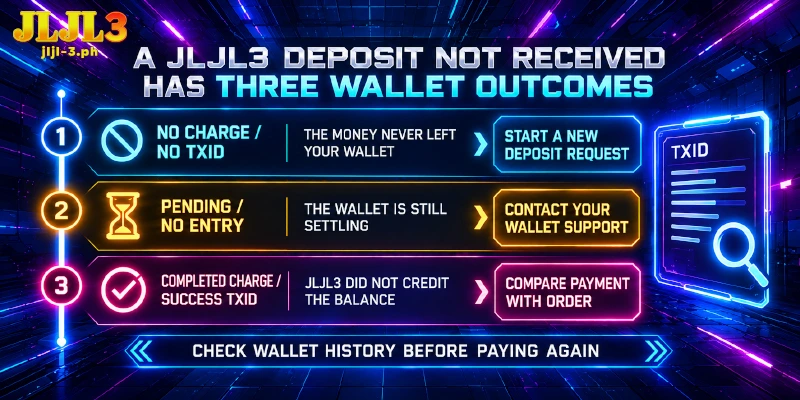
A JLJL3 Deposit Not Received Has Three Wallet Outcomes, Each With One Next Step
Your wallet’s transaction history sorts the problem into one of three outcomes. The same three apply to every channel, including USDT sent from a crypto wallet or exchange, where the TXID (the transfer’s transaction ID) stands in for the wallet entry.
Once you press Apply for Deposit, the payment popup opens, and your wallet records every payment made from it. If a JLJL3 deposit is not received, match that record to this table, whose rows follow the order of the sections below:
| What your history shows | What it means | Go to |
|---|---|---|
| No charge, or no TXID for a USDT transfer | The money never left your wallet, so JLJL3 has received nothing | Where Each Channel Stalls |
| Pending, or a deduction with no entry | The wallet has not finished settling the payment | Your Wallet’s Support First |
| A completed charge, or a USDT transfer marked Success | The payment posted but JLJL3 has not credited the deposit, so it differs from the deposit order or needs a support check | Compare Payment and Order |
GCash’s own Help Center puts the check ahead of the retry: look in Transaction History, where a completed QR payment reads Pay via Scanned QR, and do not retry first, to avoid a double charge. Maya, GoTyme, and bank apps keep their own histories, so open the one that sent the payment.
Check Where Each Channel Stalls When Your Wallet Shows No Charge
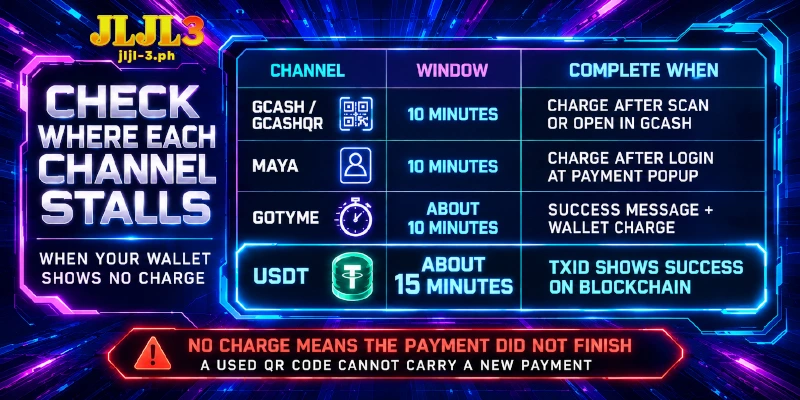
No charge in your wallet means the money never left, so a JLJL3 deposit is not received only because the payment never finished. You lose nothing, and a fresh Apply for Deposit request starts the payment again; the notes below name the step where each channel stops.
Each channel gives a fixed window to finish the payment, and a payment counts as complete only when the wallet shows the charge or the TXID reads Success:
| Channel | Window | The payment is complete when |
|---|---|---|
| GCash and GCashQR | 10 minutes | GCash shows a charge after the scan or the Open in GCash step |
| Maya | 10 minutes | Maya shows a charge after the login at the popup |
| GoTyme | About 10 minutes, on a live countdown | The GoTyme app shows a success message and a charge |
| USDT | About 15 minutes | The TXID reads Success on the blockchain |
Two plain failures apply to every channel: too little balance in the wallet and a poor connection during payment. Maya’s business guide lists both among the causes of a failed payment.
GCash and GCashQR: The Window Is 10 Minutes and One Code Works Once
The GCash channel offers two payment popups. One shows a QR code that works once, next to an Open in GCash button; the other asks you to finish the payment in your GCash app, through Open in GCash or by logging in to GCash and scanning a code.
On the GCashQR channel, the Pay with QRPh popup lists an Order No and an Amount Due above the code, and its Next button still opens the GCash app. QRPh is the shared QR standard of Philippine wallets and bank apps.
On either channel, the sign is a deposit not received at JLJL3 and a history with no entry after your last scan. A spent code cannot carry a new payment, so the next step is a new Apply for Deposit and a scan of the new code.
Maya: The Payment Is Confirmed Only After the Login Popup
Maya’s popup is titled Login Maya to confirm payment and asks for your Maya mobile number and password. A JLJL3 deposit is not received on Maya when the popup stays at the login step, and the Maya history then shows no charge.
For a deposit not received at JLJL3 on Maya, request a new deposit on the Maya channel, complete the login at the popup, and check the Maya history for the charge.
GoTyme: The Countdown Is About 10 Minutes and the QR Code Changes
GoTyme’s popup shows the amount, a QR code, and a live countdown. It warns that the QR code changes in real time and says not to repeat payment, and its two buttons, Scan for discounts and Pay for instant receipt, both need the GoTyme app.
GoTyme’s help center says a QRPh payment ends with a success message in the app. A JLJL3 deposit not received on GoTyme, with no such message, an empty history, and an expired countdown, means no charge.
USDT: The Window Is About 15 Minutes, and No TXID Means Nothing Was Sent
Every USDT deposit converts your peso amount into USDT at the current rate. The popup shows the USDT amount, a QR code, and an address on the USDT-TRC20 network (TRON).
The TXID, the ID that the blockchain assigns to every transfer, proves a sent transfer. According to OneKey’s TRC20 transfer guide, a missing TXID points to a transfer that was never broadcast.
With a USDT deposit not received at JLJL3 and no TXID, you start over with a new deposit request and a new transfer from your wallet or exchange.
Retrying is safe only when the history shows no charge: a GCash popup’s QR code works once and the GoTyme popup says not to repeat payment, so a second payment on top of a charge that has not appeared yet adds a charge instead of fixing one.
Use Your Wallet’s Support First for a Pending or Missing Payment
Whether the wallet shows pending or a deduction has no entry in your history, the wallet’s own support holds the answer, not the Deposit screen. Pressing Apply for Deposit again answers neither case.
According to GCash’s Help Center, a payment confirmed at checkout should reach the merchant right away, and its two checks are the details you entered and the Transactions page. When the balance dropped but the transaction is missing or pending, GCash directs you to its own support through the Help Center.
Maya, GoTyme, and bank apps hold their own records, so their support is the place to ask about a pending or missing entry.
For USDT, a JLJL3 deposit is not received while the TXID is marked Pending. TRON adds a block about every three seconds, yet a block time is no promise of arrival, and receiving platforms can add their own confirmations on top, so the TXID status, not a stopwatch, tells you where the transfer stands.
Do not send the USDT again while the status reads Pending. A Failed status or a missing TXID goes to the wallet or exchange that sent the transfer.
Pending looks like a failure on a deposit not received at JLJL3, but it is not one: the payment is still in flight, so waiting costs minutes while a second payment costs a second charge.
When the Charge Posts but the Balance Stays, Compare Payment and Order
With a completed charge and a JLJL3 deposit not received, the payment and the deposit order differ somewhere, or support has to match them before the credit reaches your balance. Do not press Apply for Deposit again at this point, because a second request means a second payment and a second charge.
Two checks follow: the first applies to every channel, the second to USDT only.
Amount or Receiving Account: You Paid Something Other Than the Deposit Order
Each deposit order carries one amount and one receiving account, and the Quick Deposit Steps on the Deposit screen ask for the correct amount and the correct receiving account. Compare the Amount Due on the popup with the amount on your wallet receipt.
Every deposit also requires a fresh account, because the Deposit screen says not to save account information. Paying a saved account, or a code from an earlier attempt, is the second place to look.
After a mismatched payment, keep the wallet receipt, note the Order No if the popup showed one, and send both to support instead of paying again.
USDT: A Short Amount or the Wrong Network Never Matches the Order
Only USDT-TRC20 on the TRON network reaches the USDT address, and the amount must match the order. An exchange that deducts its withdrawal fee from the amount sends less than the order asks for, and that shortfall keeps the deposit from arriving.
As an illustration, an order for 20 USDT sent from an exchange that takes a 1 USDT fee out of the amount delivers 19 USDT, so the TXID reads Success on the blockchain while the deposit stays out of your balance.
Despite a Success TXID, a JLJL3 deposit is not received if the amount or the network differs from the order. A transfer sent over another network does not match the USDT-TRC20 address, and the TXID shows which network carried the transfer. Send the TXID and the amount that arrived to support instead of sending USDT again.
If the amount, the receiving account, and the network all match the order, the case belongs to support, with the receipt, the Order No, or the TXID attached.
Support Is the Next Step After a Posted Charge, With Three Details to Attach
A JLJL3 deposit not received yet, with a completed wallet charge, no credit, and a payment window that has closed, goes to support. The charge is the trigger: with no charge the fix is a new deposit request, and with a pending entry the wallet settles the payment first.
Support answers on two channels, around the clock, when a JLJL3 deposit is not received after a posted charge. The Customer Service button starts a live chat, and the chat window promises a reply in a few minutes. Telegram support is listed as JLJL3- 24/7 Support.
Open the first message with three details, so support can tie the payment to a single order:
- Your username and the channel you used: GCash, GCashQR, Maya, GoTyme, or USDT.
- The amount, the time of payment, and a screenshot of the wallet receipt that shows the charge.
- The Order No from the Pay with QRPh popup, or the TXID of a USDT transfer, when you have one.
GCash users also have a route inside the app: open the QR payment in Transactions, tap Get Help, and choose Merchant didn’t receive this payment. GCash asks for the QRPH Reference or Invoice Number from your app inbox, so keep that message.
FAQ
These questions sit at the edges of the three outcomes, where the scanning app, the amount sent, or a wallet’s own review process changes the answer.
Can I Scan a Deposit QR Code With a Different App?
Yes, within the limits of each popup. The GCash popup’s QR code scans from GCash, Maya, GoTyme, or any app that supports QRPh, and the Pay with QRPh popup scans from Maya, ShopeePay, or any bank app. Check the history of the app that scanned the code, because that app holds the charge.
How Much USDT Should I Send for a Deposit?
Send the USDT amount shown in the deposit popup. JLJL3 converts your peso amount at the current rate when you press Apply for Deposit, so a figure you work out from another rate may not match the order. If your exchange deducts its fee from the amount you enter, add the fee, so the order receives the full figure.
How Long Does a GCash Review of a Missed Payment Take?
GCash’s Help Center says the merchant and bank review takes 6 to 10 business days for GCash merchants and 10 to 12 business days for QRPH merchants. After a merchant confirms a refund, GCash adjusts the wallet within 24 to 72 hours. That schedule belongs to the GCash route, so the support channels above stay the first step.
Only a Posted Charge Is a Case for JLJL3 Support; the Wallet Comes First
The opening question, whether your wallet charged you, turns a JLJL3 deposit not received into one of three cases with a single next step each: a new request, the wallet’s support, or JLJL3 support. The same order protects the balance you still hold, because a second payment adds a charge to untangle.