
JLJL3 Customer Service: Which Channel Handles Which Task
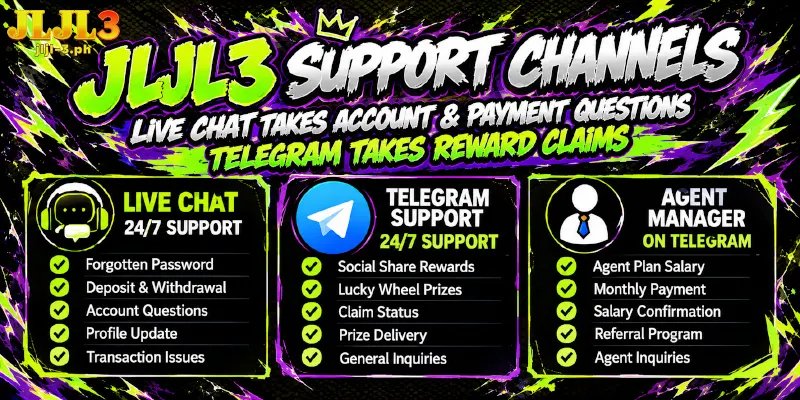
JLJL3 customer service runs 24/7 in live chat and on the JLJL3 Telegram support account. Live chat, that Telegram account and agent managers each handle separate tasks, so a forgotten-password ticket, a prize claim and a salary question each start in their own place.
Live Chat Takes Account and Payment Questions; Telegram Takes Reward Claims
Customer service at JLJL3 takes account access and payment questions in live chat and reward claims on Telegram. You send salary questions to an agent manager, and the last column lists what to have ready for each task.
| Task | Channel and hours | Have ready |
|---|---|---|
| Forgotten password | Live chat, 24/7 | Phone number, username and the important information added to the account; live chat may also ask for the last deposit amount or the last game played |
| Deposit or withdrawal question | Live chat, 24/7, as the first stop | Route, amount, time and a screenshot, as detailed below |
| Social Share reward, for sharing a post on Facebook | Telegram support account, 24/7 | A screenshot of the Facebook post you shared, which has to stay up for at least 24 hours |
| Physical prize from the daily login Lucky Wheel | Telegram support account, 24/7 | A screenshot of the prize notice, plus the recipient’s name, address and phone number; the prize ships free |
| Agent Plan monthly salary, from the referral program | Agent manager on Telegram | The 3rd of the following month, when the system issues the salary; the agent manager can confirm the payment |
Two details sit outside the rows of the table but change which channel you open:
- Telegram accounts: the official Telegram channel is a separate account from the support one. You join the channel for Telegram Coupons, and the Social Share and prize claims in the table go to the support account.
- Live chat language and speed: live chat offers quick replies in English, and the chat widget states a reply time of a few minutes.
Social Share and prize claims both end in a Telegram message with a screenshot attached, so capture the screenshot before you open Telegram; a forgotten password needs only text, so live chat is enough.
JLJL3 Contact Details: Two 24/7 Channels Plus Email, Phone, and Address
Customer service for JLJL3 keeps live chat and the Telegram support account open 24/7, while the email, phone and contact address are published for reference.
- Live chat, 24/7: the Customer Service button on the floating widget opens the chat window, and the widget appears on every page.
- Telegram support, 24/7: send messages to the account called JLJL3- 24/7 Support.
- Email: [email protected]
- Phone: (+63) 905 731 2846
- Contact address: 735 San Sebastian St, Quiapo, Manila, 1001 Metro Manila, Philippines
Start Every Deposit or Withdrawal Question With Four Details
You can open a deposit or withdrawal question to customer service from JLJL3 with route, amount, time and proof already in the first message, and the table shows the form each detail takes in each case.
| Detail | Deposit question | Withdrawal question |
|---|---|---|
| Route | The channel you paid with: GCash, GCash QR, Maya, GoTyme or USDT-TRC20 | The wallet that receives the money: GCash or Maya |
| Amount | The figure you chose on the Deposit page, exactly as typed | The figure you entered on the Withdraw page, exactly as typed |
| Time | When you pressed Apply for Deposit | When you pressed Submit; the Withdraw page shows a Withdrawal Time of 24 hours, so the submission time tells you whether the request is still inside that time |
| Proof | A screenshot of the payment popup; a popup from QRPh, the Philippine QR standard, carries an Order No beside the Amount Due, so capture both | A screenshot from your GCash or Maya transaction history |
FAQ
The questions below mark the edge of customer service at JLJL3: four rewards that need no message, and the one thing no message should carry.
Do I Need to Message Support to Claim Super Ace Lucky Bet?
No. You claim the reward yourself from 00:20 the next day, under Lucky Bet in the Reward Center, the account screen where you collect rewards.
Where Do I Collect Instant Rebate and Vouchers?
In two different places inside the account. Each reward has its own screen, so neither collection involves a message to support.
- Instant Rebate, the rebate paid on your daily bets: you claim it by hand in Manual rebate, inside the Member Center.
- Vouchers: the Receive Center inside the Reward Center shows Description, Remaining and Deadline for each voucher, and you press Receive to collect the reward.
Does the First Deposit Bonus Need a Support Request?
No. You pick the bonus in Choose Promotion on the Deposit page, and the bonus activates with no setup.
What Should Never Go Into a Support Message?
Your login password and your Transaction Password, the second being the password you type to confirm each withdrawal. The forgotten-password ticket at JLJL3 needs a phone number, a username and the important information added to the account, so neither secret has a reason to appear in a message.
JLJL3 Customer Service Works by Task, Not by Hour
Both main channels stay open day and night, so you pick the channel by task, not by hour. Before you write to customer service for JLJL3, name the task first, since four rewards need no message at all and every other task has one channel to start in.