
JLJL3 Register Popup: Username Form or One Tap on Telegram or Google
The JLJL3 register popup asks for three things: a username, a password and the same password again, with no phone number or email to give. The conditions sit after the form: a one-account rule, a Register Golden Egg voucher that lasts about one to two days once you register at JLJL3, and a wallet link before the first withdrawal.
Two JLJL3 Register Entries Share One Popup, and Neither Asks for Phone or Email
Both entries open from the same popup, and neither asks for a phone number, an email address, an OTP (the one-time code a site texts you) or a referral code. You upload no document to complete JLJL3 registration either.
Each entry asks for a different amount of typing and leaves you with something different, so the table compares both and adds when each one fits.
| Entry | What you type | What you keep | Fits when |
|---|---|---|---|
| Three-field form | Username, Password, Confirm password | The username and password | You want a login of your own |
| One tap | Nothing; you confirm a linking popup | A Telegram or Google account you can open | You would rather not manage another password |
Between the two entries you decide one thing: whether to keep a password of your own or to lean on a Telegram or Google account you can open.
A Second Account Forfeits Bonuses, So Settle Age and Password First
A duplicate account puts both bonuses at risk, so you run three checks before the first tap: the one-account rule, your age and your password.
- One account. The Register Golden Egg allows one claim per IP address (the network address your connection uses), so two people on the same connection share a single claim, and JLJL3 takes the whole reward back when several accounts turn up. The first deposit bonus follows a similar rule: when an account shares an IP address, an e-wallet (a GCash or Maya account that holds your balance) or a phone number with another account, JLJL3 confiscates both the winnings and the bonus.
- Age. You must be 21 or older to open an account.
- Password. Pick the password before you open the JLJL3 register form, because the form takes only letters and numbers; mix upper and lower case with digits, as the Security Level screen under My Account recommends. JLJL3 sends no reset link by email, so a forgotten password goes through live chat support.
After a forgotten password, you may be tempted to register at JLJL3 a second time, which is exactly the duplicate the bonus rules punish. Ask live chat support to get you back into the first account instead.
Register at JLJL3 in Six Steps, With Each Field’s Character Rules
To register online at JLJL3, fill the three fields of the popup and tap Register. A field that breaks a rule shows an orange message directly under the input box, and Register stays unresponsive until you correct the entry, so each step below carries the rule for that field.
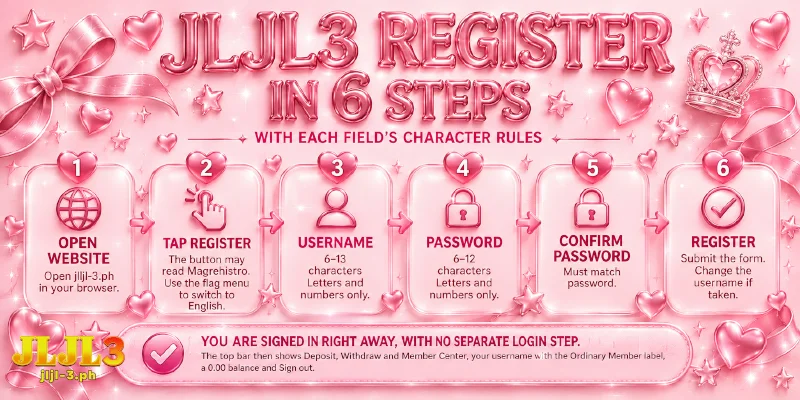
- Open jljl-3.ph in your browser.
- Tap Register. The interface opens in Tagalog by default, so the button may read Magrehistro; the flag menu in the top bar switches the language to English. A popup with the logo and three fields, each marked with an asterisk, confirms you are in the right place.
- Type the username you want into the Username field, which takes 6 to 13 characters, letters and numbers only. Any other character makes “No special characters allowed” appear under the field.
- Type your password into the Password field, which takes 6 to 12 characters, letters and numbers only, so a 13-character username cannot double as a password. The eye icon at the right edge of the field shows what you typed, which helps you catch a slipped key.
- Type the same password into the Confirm password field, which has a second eye icon. If the two entries differ, “Incorrect confirmation input” appears under the field.
- Tap Register to submit the JLJL3 registration form. If another member already holds the username, a box reads “This username has already been taken by another user. Please enter a different username.”; tap OK, change the Username field and tap Register again.
You are signed in the moment your JLJL3 registration goes through, with no separate login step. The top bar then shows Deposit, Withdraw and Member Center, your username with the Ordinary Member label, a 0.00 balance and Sign out.
If you registered before, the Login link at the bottom of the popup leads to sign in instead, so use the link rather than creating a duplicate.
Tap Telegram or Google to Replace the Whole JLJL3 Registration Form
Under the line “No sign-up needed, tap to login instantly!”, the JLJL3 register popup carries two buttons, Telegram and Google, and tapping either button replaces all three fields. Check that you can open the Telegram or Google account on this device before you start, because the one tap links your account to that Telegram or Google account.
- Open the popup as in steps 1 and 2 above.
- Under the banner line, tap Telegram or Google.
- Verify and connect your Telegram or Google account in the popup that opens; once connected, the account is ready to use.
Back at the Login popup, the same two buttons give you a one-tap sign in later.
Claim the Voucher First, Then Link a Wallet and Choose the Deposit Promotion
The Register Golden Egg voucher appears as soon as you register at JLJL3, with a random reward of up to ₱8,888 for new members. The deadline is about one to two days, so claim the voucher before anything else.
Open Member Center in the top bar, then the Reward Center section, where vouchers wait to be received. Find Smash & Win, the name of the Golden Egg voucher, read the time remaining on that row and tap Receive.
Before your first withdrawal, you link a GCash or Maya e-wallet and set a Transaction Password, the separate password that confirms every money action; a wrong name on the wallet makes the withdrawal fail.
On the JLJL3 registration form, no field takes a promo code; you choose the first deposit bonus on the deposit screen instead. In the Choose Promotion step, which sets the bonus a deposit carries, pick New Member Bonus Up To ₱258 before you tap Apply for Deposit; the other option, Do Not Participate In Any Promotions, skips the bonus.
Each reward you take adds a turnover, the total you must bet before you can withdraw: 5x the Golden Egg amount and 6x your deposit plus the first deposit bonus.
A ₱1,000 deposit with the ₱258 bonus, for example, means ₱7,548 of bets, and only slot bets count toward that total, so Do Not Participate In Any Promotions fits a deposit meant for any game other than slots.

FAQ
Everything above stays inside the popup; the three questions below cover what sits outside.
After JLJL3 Registration, Does the First Withdrawal Need ID Documents?
No. You upload no document at registration or at withdrawal; the check before a first withdrawal is a linked e-wallet with the right name plus your Transaction Password.
Can I Register in the JLJL3 App Instead of the Browser?
Yes. The app opens on a login screen and a register screen, and installing the app is a separate job from creating the account.
Does the JLJL3 Register Popup Offer Facebook Sign-Up?
No. The popup offers the form, Telegram and Google only, so a Facebook account cannot be used to register.
Registration Is Short, but the Wallet Link Decides the First Withdrawal
JLJL3 registration ends with three fields or one tap, and everything that carries a deadline or a condition comes after: claim the Golden Egg voucher before the deadline, link a wallet with the right name and choose the promotion at deposit.