
JLJL3 Withdrawal: Three Conditions First, Then Five Steps
A JLJL3 withdrawal goes to a GCash or Maya wallet, from ₱100 to ₱49,999 per request, in up to 24 hours. Submit works only once you hold a wallet in your own name and a Transaction Password (a second password, separate from your login), and have bet through any bonus. Link the wallet before your first deposit, because editing the wallet after the First Deposit bonus costs you that bonus.
Three Conditions Stand Between You and the Submit Button
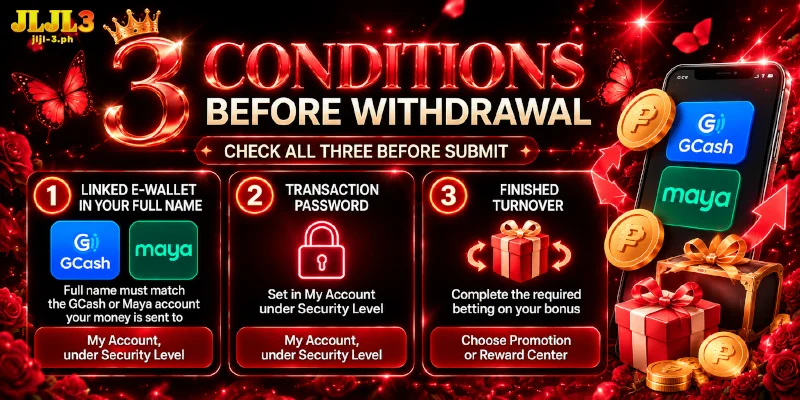
Three conditions must hold before a withdrawal at JLJL3 clears, and the table sorts them by where you set each one and what a missing one blocks.
| Condition | Where you set the condition | If missing |
|---|---|---|
| A linked e-wallet in your full name (the GCash or Maya account your money is sent to) | My Account, under Security Level | The Withdraw tab shows Add wallet, and a wallet whose name does not match makes the withdrawal fail |
| A Transaction Password | My Account, under Security Level | You cannot submit a withdrawal request |
| Finished turnover (the total you must bet on a bonus before the bonus funds can be withdrawn) | The bonus you take, chosen in Choose Promotion at deposit or received as a voucher in Reward Center | The withdrawal stays blocked until you finish |
You set two of the three in My Account, and the third follows from the bonus you take.
Link a Wallet in Your Full Name and Set the Transaction Password
Link the wallet in your full name and set the Transaction Password under Security Level in My Account, because a JLJL3 withdrawal request depends on both. The wallet decides where the money lands, and the Transaction Password decides who may send the request.
Link E-Wallet: GCash or Maya, Up to Five Wallets
Link E-wallet accepts GCash and Maya. You link a wallet in seven steps:
- Open My Account in the Member Center sidebar.
- Open Security Level, which shows your Security Level and Score.
- Under Recommended setting, open Link E-wallet.
- Choose GCASH or PAYMAYA. Maya sits under the label PAYMAYA, the name the company used before the 2022 rebrand to Maya.
- Enter your full name in Name on Card.
- Enter the wallet’s Account Number.
- Select Submit.
Repeat the steps for each extra wallet: one account holds up to five wallets, and you manage them later in the Account Management tab of the Withdrawal page. JLJL3 fails a withdrawal when the wallet name differs from your withdrawal details, so type your full name exactly as written on the wallet.
Finish the wallet setup before your first deposit. The First Deposit bonus activates the moment you deposit, and editing the name or number of your GCash after that costs you the bonus.
Transaction Password: The Second Password the Submit Step Asks For
Your Transaction Password sits next to your login password as a second credential, which means a person who has only your login cannot submit a withdrawal at JLJL3. Choose one that differs from your login password, since a second credential adds protection only while it cannot be guessed from the first. You set the Transaction Password in four steps:
- In Security Level, open Transaction Password.
- Enter the password in New.
- Enter the same password again in Confirm.
- Select Submit.
With the wallet linked and the Transaction Password set, the account is ready for the Withdraw tab.
Bonus Turnover Has to Clear Before a Withdrawal Goes Through
The third condition for a JLJL3 withdrawal comes from the bonus you take. Each bonus sets a separate turnover multiplier, from 1x on VIP rewards and Daily Deposit Cashback up to 6x on the First Deposit bonus, and the terms of each bonus also say which games count toward the total.
On the First Deposit bonus, the 6x multiplier applies to your deposit plus the bonus, and only bets on Slots count toward that total. As an example, a ₱500 deposit brings a ₱178 bonus, so you bet (500 + 178) × 6 = ₱4,068 on Slots before a withdrawal at JLJL3 goes through.
Some bonuses also cap what you can withdraw: when the Register Golden Egg, a new-member bonus, pays less than ₱150, the withdrawal falls between ₱100 and ₱150. Read the terms before you take a bonus.
Choose Promotion appears while you deposit, which means you settle the multiplier before the money arrives. That is the moment to weigh the multiplier against the size of the bonus. The same screen has a Do Not Participate In Any Promotions option.
How to Request a JLJL3 Withdrawal in Five Steps From the Withdraw Tab
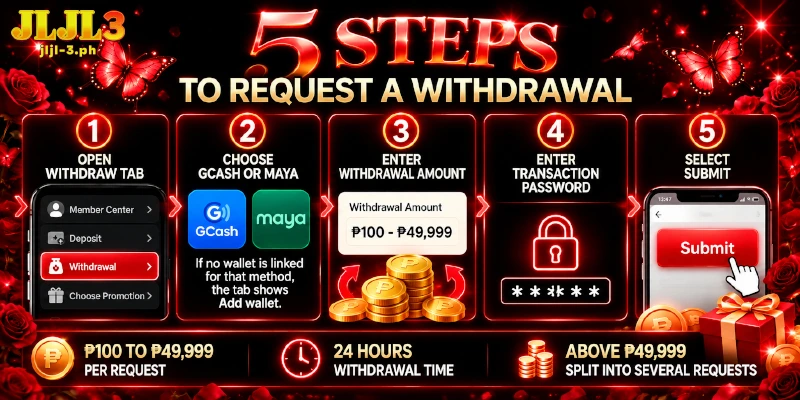
With the wallet, the Transaction Password and the turnover in place, a withdrawal at JLJL3 takes five actions:
- Open the Withdraw tab under Withdrawal in the Member Center sidebar.
- Choose GCash or Maya. If no wallet is linked for that method, the tab shows Add wallet.
- Enter the Withdrawal Amount. The JLJL3 withdrawal limit is ₱49,999 per request, and the field shows the range from ₱100 to ₱49,999.
- Enter your Transaction Password.
- Select Submit.
A GCash withdrawal at JLJL3 and a Maya withdrawal at JLJL3 follow the same range and the same time limit. The Withdrawal page shows Withdrawal Time: 24 hours. An amount above ₱49,999 goes out as several requests, so ₱120,000 becomes ₱49,999, ₱49,999 and ₱20,002.
Withdrawals Take Up to 24 Hours, and Your Wallet’s Own Limits Still Apply
After you select Submit, the JLJL3 withdrawal time is up to 24 hours, and a request still unpaid after 24 hours is a case for live chat, which is open 24/7. Before you do, check three details: the account number against the wallet, the amount against the range on the Withdraw tab, and the wallet name against your withdrawal details.
GCash and Maya also apply limits of their own, and each wallet measures the limit differently:
| Wallet | What the limit measures | Basic account | Fully Verified or Upgraded account |
|---|---|---|---|
| GCash | Money received per month | ₱5,000 | ₱1,000,000 |
| Maya | Wallet balance | ₱50,000 | ₱100,000 |
Figures follow the GCash Help Center (limits effective October 1, 2026) and the Maya account-limit page, and Basic means an account that has not completed identity verification. A single JLJL3 request can reach ₱49,999, so check the limits of your own wallet before you withdraw a large amount.
FAQ
Five steps cover what you press; the three answers below cover what the account allows.
Can I Withdraw to a Bank Account or USDT?
No. A withdrawal at JLJL3 goes to GCash or Maya only. USDT (a crypto coin pegged to the United States dollar) and GoTyme work for deposits, not for withdrawals.
Do I Need to Upload ID Documents for a Withdrawal at JLJL3?
No. JLJL3 does not ask you to upload documents; the wallet name and the Transaction Password do the verifying instead. That is why the name on the wallet has to be your own.
How Many Withdrawals at JLJL3 Can I Make in a Day?
Daily requests are not capped: the Withdraw tab shows Remaining Number of Withdrawal Today as 9999. Each request still stays inside the per-request range, so a large payout splits into several requests.
A JLJL3 Withdrawal Is Settled Before You Select Submit
Wallet name, Transaction Password and bonus turnover all sit in the account before the Withdraw tab opens. What remains for a withdrawal at JLJL3 is five actions and a wait of up to 24 hours.