
JLJL3 Privacy Policy Starts With a Three-Field Form and Grows to Five Entries Before You Withdraw
This JLJL3 privacy policy lists the entries the account asks for at four points: sign-up, wallet setup, payment and support. The count runs step by step, so you can see that the sign-up form asks for three fields while the setup before a first withdrawal asks for five entries. Each screen named below asks for an entry or shows a record, and the text says what the entry does there.
JLJL3 Privacy Policy Entries by Step: Three at Sign-Up, Five Before Withdrawing
The privacy policy at JLJL3 counts three fields on the sign-up form, Username, Password and Confirm password, and none on the one-tap route through Telegram or Google. You set up five entries before a first withdrawal: three on the Link E-wallet screen for a GCash or Maya wallet, and two on the Transaction Password screen.
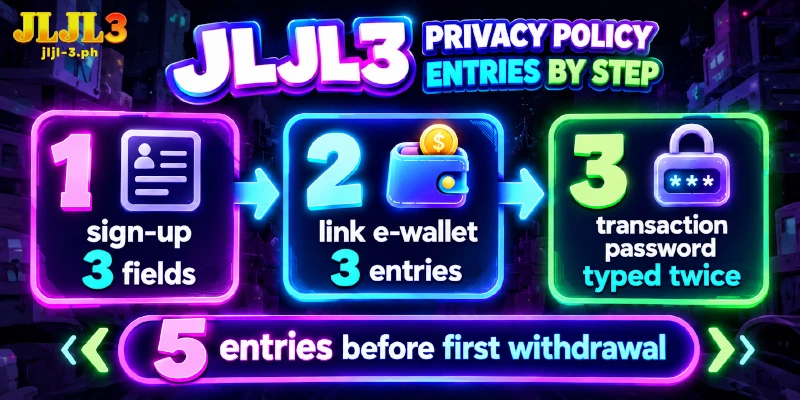
An entry here means a field you type or a choice you make, and the table lists them in the order the account asks for them.
| Step | Entry | Screen | What the entry does |
|---|---|---|---|
| Sign-up form | Username, Password, Confirm password | Register popup | The Username and Password pair is what the Login popup asks for on later visits |
| One-tap route | No fields; you link a Telegram or Google account | Register popup | Takes the place of the three form fields |
| Personal Information | Nickname, linked Google account, Email | Security Level screen in My Account | Sits among the three recommended settings next to the Security Level score |
| Link E-wallet | Wallet type (GCASH or PAYMAYA), Name on Card, Account Number | Security Level screen | Names the wallet that a withdrawal pays into; Name on Card takes the wallet owner’s full name |
| Transaction Password | A new password, typed twice | Security Level screen | The Withdraw tab asks for the password before Submit |
Only two rows are tied to money: Link E-wallet decides where a withdrawal is paid, and Transaction Password decides what confirms the withdrawal. A first withdrawal needs both settings. Personal Information is the third recommended setting but not one of the two prerequisites, and the other rows hold sign-in entries.
Up to Five E-Wallets Can Sit on One Account
A JLJL3 account accepts up to five wallets on the Link E-wallet screen. Each added wallet repeats the three entries of the first: the wallet type, the Name on Card and the Account Number.
At the limit, the account therefore holds up to fifteen wallet entries. Account Management, a tab on the Withdraw page, is the tab for managing those linked wallets.
Each Deposit Carries Separate Payment Details, While Withdrawals Reuse a Linked Wallet
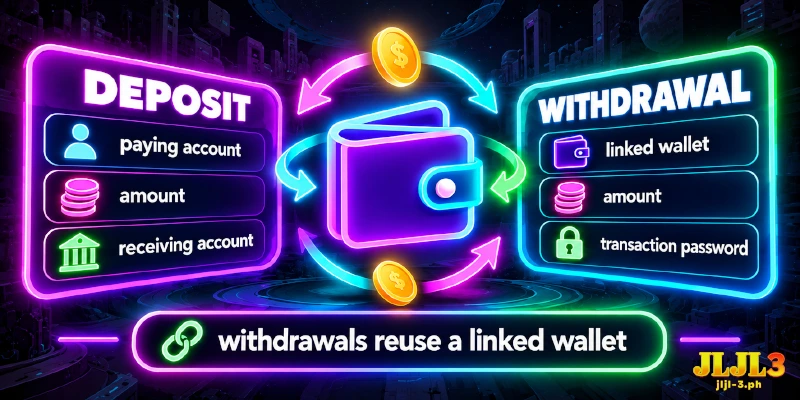
A deposit and a withdrawal handle payment details in different places, and the privacy policy at JLJL3 treats them separately. The table sets the two side by side by what each request carries and where you enter it.
| Request | Details it carries | Where you enter them |
|---|---|---|
| Deposit | The paying account, the amount and the receiving account | The step list on the Deposit page, which tells you not to save account information |
| Withdrawal | A wallet pick, an amount and the Transaction Password, which confirms the request before Submit | The Withdraw tab, with the wallet taken from the entry you made once at setup |
Withdrawals therefore reuse a wallet entered once, while each deposit names its accounts again.
Which Screens Hold Your Records Inside the Account?
The privacy policy at JLJL3 lists three screens in the desktop Member Center sidebar that hold records, and My Account adds a fourth source in its security area.
- Betting Record
- Account Record
- Profit And Loss
- Last Login Time and IP, a line in the security area of My Account
All four open from inside the signed-in account, so reading any of them takes no message to support.
Support Receives Your Details as Text, With a Screenshot for Two Telegram Claims
Support receives your details as typed text, and two Telegram claims add a screenshot. A forgotten-password ticket in live chat carries your phone number, your username and the information you added to the account. Live chat can ask for two more details: how much you deposited last and which game you played last.
On Telegram, each of the two claims, the daily login Lucky Wheel prize and Social Share, carries a screenshot, and the prize claim adds who receives the prize: a name, an address and a phone number.
FAQ
Each question about the JLJL3 privacy policy below starts from an entry or a screen and names the place in the account where the answer sits.
Does JLJL3 Ask for an ID Document?
No. The sign-up form and the Security Level screen have no field for a document upload; the Link E-wallet screen asks for the wallet owner’s full name instead.
Is the Transaction Password the Same as the Login Password?
No, they are two separate entries: the sign-up Password opens the account, and the Transaction Password, set on the Security Level screen, is typed again to confirm each withdrawal. Choosing two different strings means that learning one does not give access to the other.
Where Do Reward Notices Arrive?
In Internal Message, a screen in the Member Center sidebar that has an Inbox and an Outbox. Reward notices arrive there from a sender labeled Platform.
Setup Takes Five Entries, and Each Request Then Carries Only Its Own Details
At JLJL3 the privacy policy places the entries at setup: three fields to open the account and five entries before a first withdrawal. After setup, each deposit, withdrawal or support message carries only the details of that one request.